Installing the Client
The BlackICE client is distributed as a single executable, which will download and install your client for you. Future updates are automatically installed when you launch the client again.
Requirements
The client has no special requirements beyond a working base game installation. The only hard dependency is the latest Visual C++ x64 Redistributable, available directly from Microsoft.
Initial installation
Run the launcher. It will offer to install the game into a subdirectory of your AppData folder:
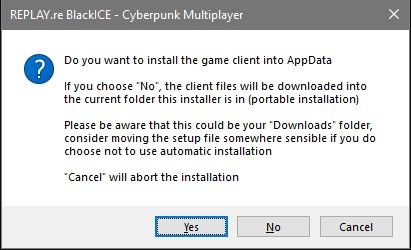
- Yes installs into
%localappdata%\replay\blackice. - No performs a portable installation: all files are downloaded into the folder the launcher executable is placed in. This is the recommended setup when running on Linux via Proton.
Downloads folder
If the launcher sits in your Downloads folder, consider moving it
somewhere sensible first. Otherwise it will be installed directly there.
Game settings
On first start the client copies your existing graphics settings from your base game installation. Afterwards, all setting changes made in the client are stored inside the client's own installation folder, so your base game installation is never modified.
Repairing or uninstalling
If an existing installation is misbehaving or a download failed, the launcher detects it and offers to verify all files and replace broken ones:
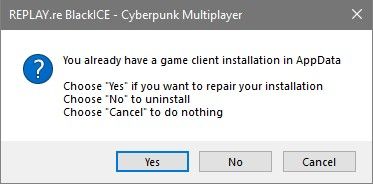
Choose Yes to repair. Choosing No uninstalls the client.
Since the installation is fully contained in a single directory, you can also uninstall manually: delete the installation directory and the desktop shortcut, if you created one.